Showing posts with label ClientScript.RegisterStartupScript. Show all posts

GridView Row Data in PopUp Using Button Click Event in Asp.Net C#

GridView Row Data in PopUp Using Button Click 

Display Database Records in  GridView Row Click Button Show Current GridView Row Details Popup Using in Asp.Net C#.

              Download Coding

                          Download

                               DEMO


                       HTML CODING


<html xmlns="http://www.w3.org/1999/xhtml">
<head id="Head1" runat="server">
    <title>GridView Row Data in PopUp Using Button Click Event in Asp.Net C#</title>   
</head>
<body>
    <form id="form1" runat="server">
    <div align="center">
    <br /><br />
        <asp:GridView ID="GridView1" runat="server" AutoGenerateColumns="False">
            <AlternatingRowStyle BackColor="Silver" />
            <Columns>
                <asp:TemplateField HeaderText="View Popup">
                    <ItemTemplate>
                        <asp:Button ID="Button1" runat="server"  Text="View Popup" OnClick="Button1_Click1" />
                    </ItemTemplate>
                </asp:TemplateField>
                <asp:TemplateField HeaderText="File Name">
                    <ItemTemplate>
                        <asp:Label ID="Label1" runat="server" Text='<%# Eval("filename") %>'></asp:Label>
                    </ItemTemplate>
                </asp:TemplateField>
                <asp:TemplateField HeaderText="File Path">
                    <ItemTemplate>
                        <asp:Label ID="Label2" runat="server" Text='<%# Eval("filepath") %>'></asp:Label>
                    </ItemTemplate>
                </asp:TemplateField>
            </Columns>
            <HeaderStyle BackColor="#CC3300" />
        </asp:GridView>
        <br />
    </div>
    </form>
</body>

</html>
                           C# CODING


using System;
using System.Collections.Generic;
using System.Linq;
using System.Web;
using System.Web.UI;
using System.Web.UI.WebControls;
using System.Data;
using System.Data.SqlClient;

public partial class _Default : System.Web.UI.Page
{
    protected void Page_Load(object sender, EventArgs e)
    {
         SqlConnection con = new
        SqlConnection(System.Configuration.ConfigurationManager.ConnectionStrings["dbcon"].ToString());
        con.Open();
        SqlCommand cmd = new SqlCommand("select * from reg", con);
        SqlDataAdapter adp = new SqlDataAdapter(cmd);
        DataSet ds = new DataSet();
        adp.Fill(ds);
        GridView1.DataSource = ds;
        GridView1.DataBind();
    }  
    protected void Button1_Click1(object sender, EventArgs e)
    {
        Button  bt = (Button)sender;
        GridViewRow gr = (GridViewRow)bt.NamingContainer;
        string filename = (gr.FindControl("Label1") as Label).Text;
        string filepath = (gr.FindControl("Label2") as Label).Text;
     
        ClientScript.RegisterStartupScript
         (this.GetType(), "alert", "alert('FileName=" + filename + "\\nFilePath=" + filepath + " ');", true);


    }

}


First Create New Web Form - Add Gridview From 

Toolbox 


Next - Gridview - EditColumn - Add TemplateField - Change HeaderText for All


Next - GridView  - Edit Template - View Popup Column - Add Button To Item Template


Next - GridView  - Edit Template - File name Column - Add Label 
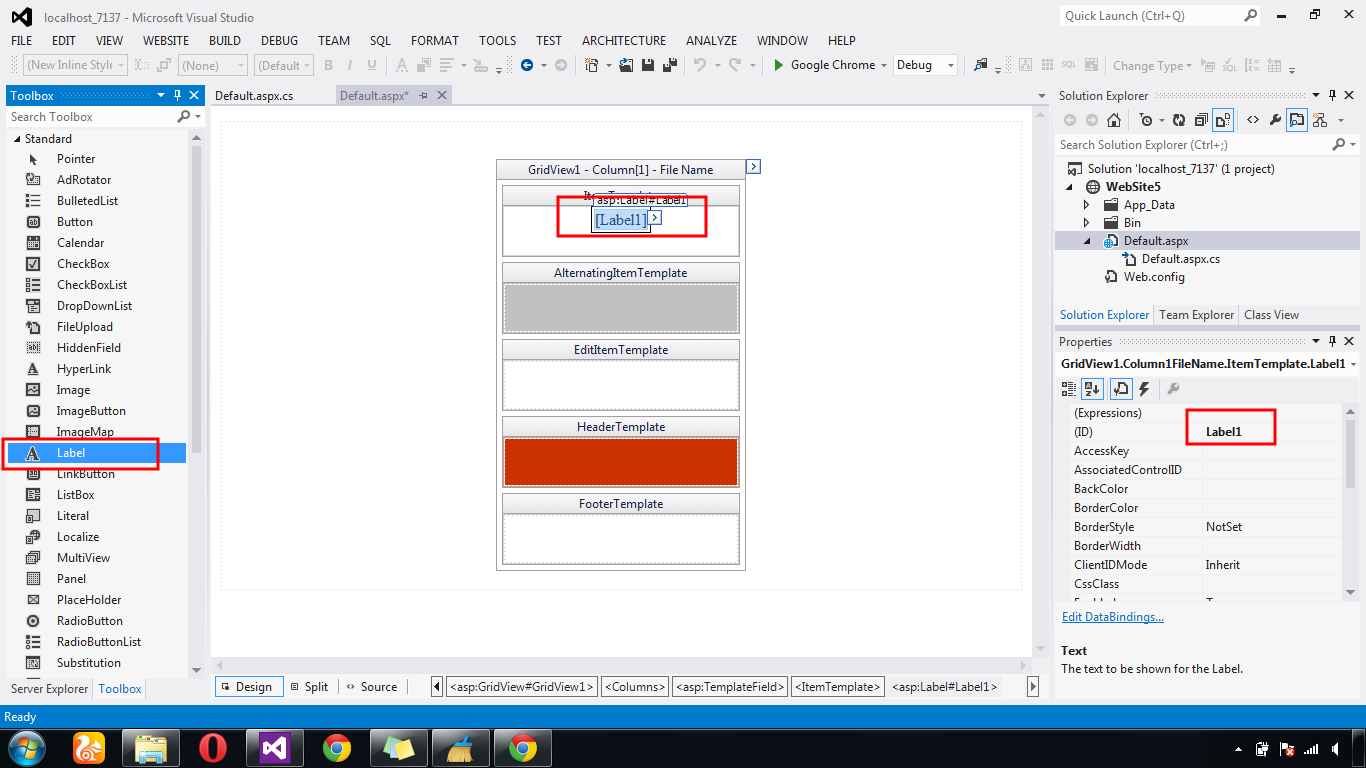


Next - Label - Edit Databinding - Add Database Fields For All Fields.


Next - Show Html GridView Row Databound Generate Coding


Next - Button Event Get  Gridview Row Values - Show Popup Script  Coding


Login Only Allow 3 Attempt And Lock The Controls Using JavaScripts in Asp.net C#

Login Only Allow 3 Attempt 

If  User Use Login Control  Three Attempts Failures  After That Lock The Login All Control Using In Asp.Net C#.

                                        DEMO


                   HTML CODING


<html xmlns="http://www.w3.org/1999/xhtml">
<head runat="server">
    <title></title>

    <script type="text/javascript">


        var Time = 60, check = null;
        function Assigninterval() {
            // One Second Set
            check = setInterval(starttimer, 1000);
        }


        function  starttimer() {
          
            Time -= 1;
            var Element = document.getElementById("Text11");
            Element.style.color = "red";
            document.getElementById("Style11").innerHTML = "Your Time Left: " + Time;

            if (Time <= 0) {
              
                clearInterval(check);
                check = null;
                Time = 0;

                document.getElementById("Style11").innerHTML = '';
                document.getElementById("txtLoginCount").readOnly = false;
                document.getElementById("txtUsername").readOnly = false;
                document.getElementById("txtPassword").readOnly = false;
              
       document.getElementById('<%= Login1.ClientID %>').disabled = false;
            }
            else {

                document.getElementById("txtLoginCount").readOnly = true;
                document.getElementById("txtUsername").readOnly = true;
                document.getElementById("txtPassword").readOnly = true;
              
       document.getElementById('<%= Login1.ClientID %>').disabled = true;
            }
          
        }


</script>
          

</head>
<body>
    <form id="form1" runat="server">
        <div id="Text11">
         <p id="Style11" style="font:bold 24px caption"></p>
</div>
    <div id ="loc">
   
        <table><tr><td>
            <asp:Label ID="Label1" runat="server" Text="Login Count"></asp:Label>
            </td><td>
        <asp:TextBox ID="txtLoginCount" runat="server">0</asp:TextBox>
            </td></tr>
            <tr><td>
                <asp:Label ID="Label2" runat="server" Text="Username"></asp:Label>
                </td><td>
        <asp:TextBox ID="txtUsername" runat="server"></asp:TextBox>
                </td></tr>
            <tr><td>
                <asp:Label ID="Label3" runat="server" Text="Password"></asp:Label>
                </td><td>
        <asp:TextBox ID="txtPassword" runat="server"></asp:TextBox>
                </td></tr>
            <tr><td></td><td>
        <asp:Button ID="Login1" runat="server" OnClick="LoginButton_Click1" Text="Login" Height="26px" Width="76px"  />
                </td></tr>

        </table>
   
          
    </div>

    </form>     


</body>
</html>


                      C# CODING


using System;
using System.Collections.Generic;
using System.Linq;
using System.Web;
using System.Web.UI;
using System.Web.UI.WebControls;

public partial class Default2 : System.Web.UI.Page
{
    protected void Page_Load(object sender, EventArgs e)
    {
      
    }    
   
  
    protected void LoginButton_Click1(object sender, EventArgs e)
    {
        if (txtUsername.Text == "A" && txtUsername.Text == "A")
        {
            Response.Write("OK");
        }
        else
        {
            int count = 1;


            txtLoginCount.Text = (count + Convert.ToInt32(txtLoginCount.Text)).ToString();


            if (Convert.ToInt32(txtLoginCount.Text) > 3)

            {

              
           System.Web.UI.ScriptManager.RegisterClientScriptBlock(Page, typeof(Page), "Script", "Assigninterval();", true);

             
                txtLoginCount.Text = "0";
                               
            }

            else

            {

                Response.Write(" Invalid Username or Password");
            }                                  
        }
    }
}


First - Add The New Web Form - Select The  TextBoxes & Buttons - Login Count TextBox Text=0


Next - Login Button Select - Write Below Coding


Next - Set The Intervel Time  - If Start Timer Lock The Button & TextBoxes


If  Timer TimeOut  Enable The All Textboxes & Buttons


Next - Run[F5] The Program - Starting  Count = 0 When count =4 Timer Will Start Controls Lock