GridView Row Data in PopUp Using Button Click
Display Database Records in GridView Row Click Button Show Current GridView Row Details Popup Using in Asp.Net C#.
Download Coding
Download
DEMO
HTML CODING
<html xmlns="http://www.w3.org/1999/xhtml">
<head id="Head1" runat="server">
<title>GridView Row Data in PopUp Using Button Click Event in
Asp.Net C#</title>
</head>
<body>
<form id="form1" runat="server">
<div align="center">
<br /><br />
<asp:GridView ID="GridView1" runat="server" AutoGenerateColumns="False">
<AlternatingRowStyle BackColor="Silver" />
<Columns>
<asp:TemplateField HeaderText="View
Popup">
<ItemTemplate>
<asp:Button ID="Button1" runat="server" Text="View Popup" OnClick="Button1_Click1" />
</ItemTemplate>
</asp:TemplateField>
<asp:TemplateField HeaderText="File
Name">
<ItemTemplate>
<asp:Label ID="Label1" runat="server" Text='<%# Eval("filename") %>'></asp:Label>
</ItemTemplate>
</asp:TemplateField>
<asp:TemplateField HeaderText="File
Path">
<ItemTemplate>
<asp:Label ID="Label2" runat="server" Text='<%# Eval("filepath") %>'></asp:Label>
</ItemTemplate>
</asp:TemplateField>
</Columns>
<HeaderStyle BackColor="#CC3300" />
</asp:GridView>
<br />
</div>
</form>
</body>
</html>
C# CODING
using System;
using System.Collections.Generic;
using System.Linq;
using System.Web;
using System.Web.UI;
using System.Web.UI.WebControls;
using System.Data;
using System.Data.SqlClient;
public partial class _Default : System.Web.UI.Page
{
protected void Page_Load(object sender, EventArgs e)
{
SqlConnection con = new
SqlConnection(System.Configuration.ConfigurationManager.ConnectionStrings["dbcon"].ToString());
con.Open();
SqlCommand cmd = new SqlCommand("select * from
reg", con);
SqlDataAdapter adp = new SqlDataAdapter(cmd);
DataSet ds = new DataSet();
adp.Fill(ds);
GridView1.DataSource = ds;
GridView1.DataBind();
}
protected void Button1_Click1(object sender, EventArgs e)
{
Button bt = (Button)sender;
GridViewRow gr = (GridViewRow)bt.NamingContainer;
string filename = (gr.FindControl("Label1") as Label).Text;
string filepath = (gr.FindControl("Label2") as Label).Text;
ClientScript.RegisterStartupScript
(this.GetType(), "alert", "alert('FileName=" + filename + "\\nFilePath=" + filepath + "
');", true);
}
}
First Create New Web Form - Add Gridview From
Toolbox
Next - Gridview - EditColumn - Add TemplateField - Change HeaderText for All
Next - GridView - Edit Template - View Popup Column - Add Button To Item Template
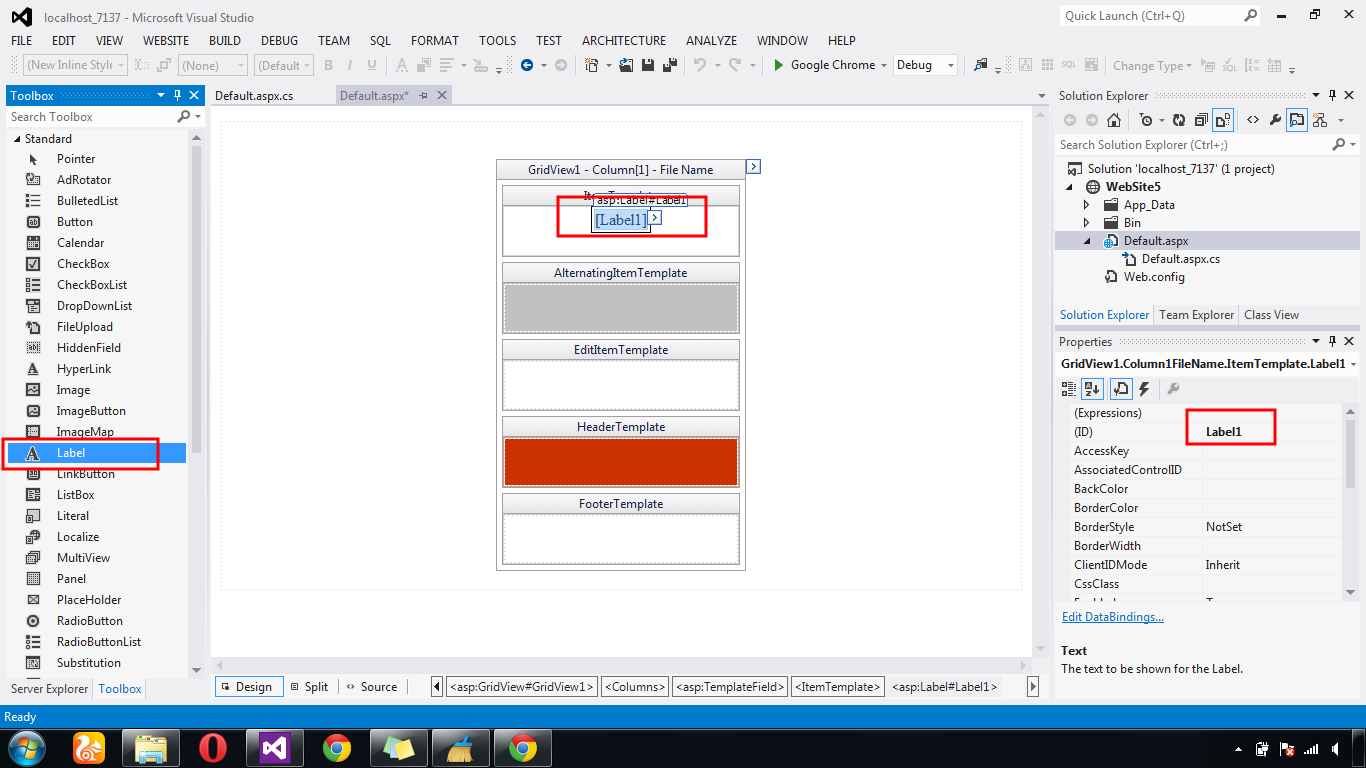
Next - GridView - Edit Template - File name Column - Add Label
Next - Label - Edit Databinding - Add Database Fields For All Fields.
Next - Show Html GridView Row Databound Generate Coding
Next - Button Event Get Gridview Row Values - Show Popup Script Coding




.gif)


