Tooltip Show in Gridview Row Details on MouseHover
GridView Show Details After Button Click ViewDetail or More Details But Now Show ToolTip Of GridView Row Full Details Using in JQuery Plugins in Asp.Net C#.
Download Coding
Download
DEMO

HTML CODING
C# CODING

Next - Gridview - Edit Column - Add Bound Field - Enter Header Text - OK
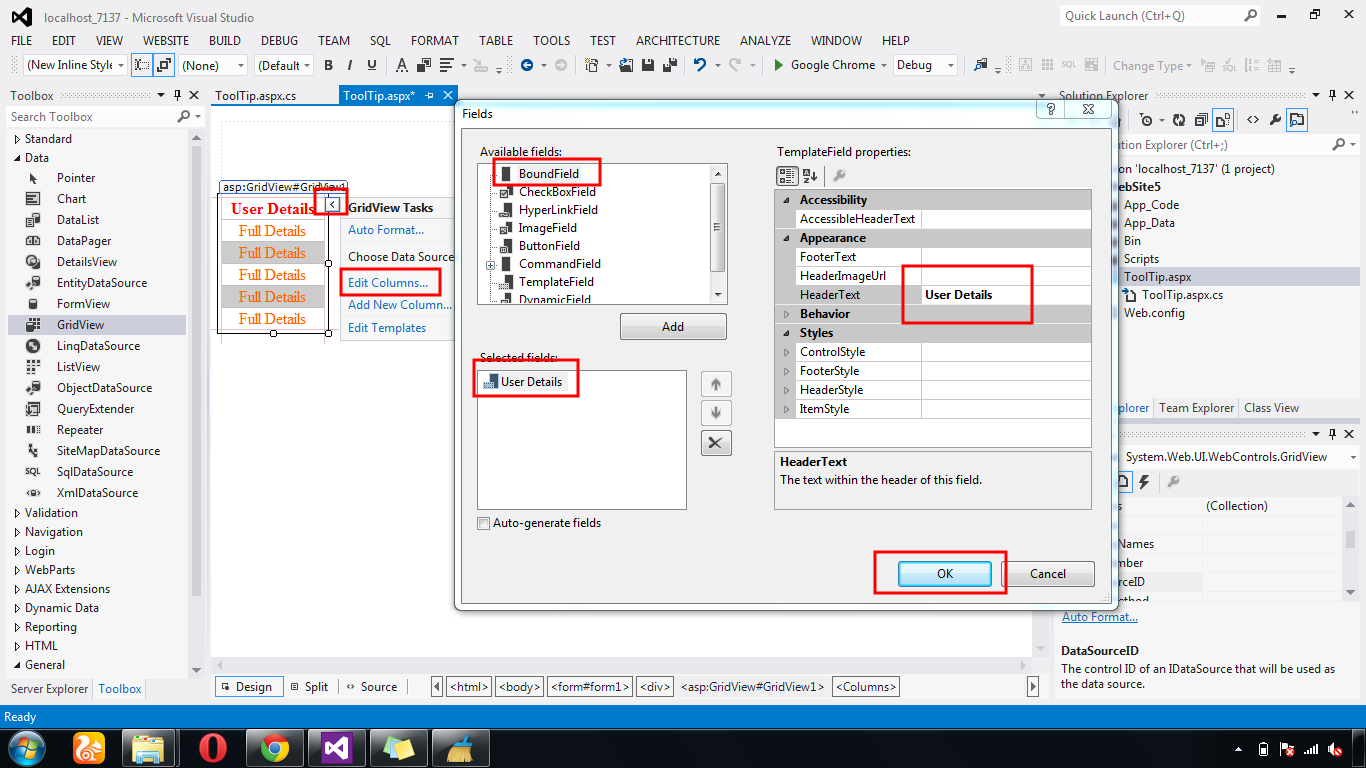
Next - Add JQuery ToolTip Plugin - Call Javascript

Next - Table Create Bind Field Names Inside Div

Next - Add Select Query For Gridview Bind All Detail

GridView Show Details After Button Click ViewDetail or More Details But Now Show ToolTip Of GridView Row Full Details Using in JQuery Plugins in Asp.Net C#.
Download Coding
Download
DEMO
HTML CODING
<html xmlns="http://www.w3.org/1999/xhtml">
<head runat="server">
<title></title>
<script src="http://code.jquery.com/jquery-1.8.2.js" type="text/javascript"></script>
<script src="JQuery/jquery.tooltip.min.js" type="text/javascript"></script>
<script type="text/javascript">
function InitializeToolTip() {
$(".Showtooltip").tooltip({
track: true,
delay: 0,
showURL: false,
fade: 150,
bodyHandler: function () {
return $($(this).next().html());
},
showURL: false
});
}
</script>
<script type="text/javascript">
$(function () {
InitializeToolTip();
})
</script>
<style type="text/css">
a {text-decoration: none;}
a :hover {color: #F7100C;}
#tooltip {
width: 320px;
height: 80px;
background: silver;
position: absolute;
-moz-border-radius: 10px;
-webkit-border-radius: 10px;
border-radius: 10px;
}
#tooltip h3, #tooltip div
{
margin: 0;
}
</style>
</head>
<body>
<form id="form1" runat="server">
<div align="center">
<asp:GridView ID="GridView1" runat="server" AutoGenerateColumns="False">
<Columns>
<asp:TemplateField HeaderText="User
Details">
<ItemStyle Width="100px" HorizontalAlign="Center" />
<ItemTemplate>
<asp:LinkButton ID="LinkButton1" class="Showtooltip" Text="Full Details" runat="server" ForeColor="#FF6600"></asp:LinkButton>
<div id="tooltip" style="display: none;">
<table>
<tr>
<td><b>File Name:</b></td>
<td><%# Eval("filename")%></td>
</tr>
<tr>
<td><b>File Path:</b></td>
<td><%# Eval("filepath")%></td>
</tr>
</table>
</div>
</ItemTemplate>
</asp:TemplateField>
</Columns>
<AlternatingRowStyle BackColor="#CCCCCC" />
<HeaderStyle ForeColor="Red" />
</asp:GridView>
</div>
</form>
</body>
</html>
using System;
using System.Collections.Generic;
using System.Linq;
using System.Web;
using System.Web.UI;
using System.Web.UI.WebControls;
using System.Data;
using System.Data.SqlClient;
public partial class ToolTip : System.Web.UI.Page
{
protected void Page_Load(object sender, EventArgs e)
{
SqlConnection con = new
SqlConnection(System.Configuration.ConfigurationManager.ConnectionStrings["dbcon"].ToString());
con.Open();
SqlCommand cmd = new SqlCommand("select * from
reg", con);
SqlDataAdapter adp = new SqlDataAdapter(cmd);
DataSet ds = new DataSet();
adp.Fill(ds);
GridView1.DataSource = ds;
GridView1.DataBind();
}
}
First Create New WebForm - Add GridView From
ToolBox
Next - Gridview - Edit Column - Add Bound Field - Enter Header Text - OK
Next - Add JQuery ToolTip Plugin - Call Javascript
Next - Table Create Bind Field Names Inside Div
Next - Add Select Query For Gridview Bind All Detail


.gif)


