Auto Suggestion Search MasterPage
Auto Suggestion Search Textbox in MasterPage Search Textbox Add to ContentPlaceHolder and Name Called to Scripts using WebService in Asp.Net C#.
Auto Suggestion Box Master Page
Auto Suggestion Box Multiple Table Search
Auto Suggestion Ajax AutoCompleteExtender
Auto Complete Search For WINDOW APPLICATION
DEMO

WebService.asmx Coding
Html Coding
First Add - New Master Page Form

Master Page Show ContentPlaceHolder

Next - Add - TextBox To MasterPage ContentPlaceHolder1 - Id Change to TextBoxAutoSearch - Class Name Add to WhatEver Use in Script Name

Next - Add To Web Service Form

Web Service.cs - Add the NameSpaces - [WebMethod] - Next Add Your Coding Below like that

Next - Add Your DataBase Table Name - Read From DataReader & DataSet

Next - Add to Master Page Scripts using JQuery - Below Like That
Call the WebService Name,Data NAme,MethodName
ContentPlaceHolder1_TextBoxAutoSuggest - used to
call the master page TextBox(search MasterPage Must Be Give ContentPlaceHolder Id from Textbox)

Insert the Date To Table Search Field
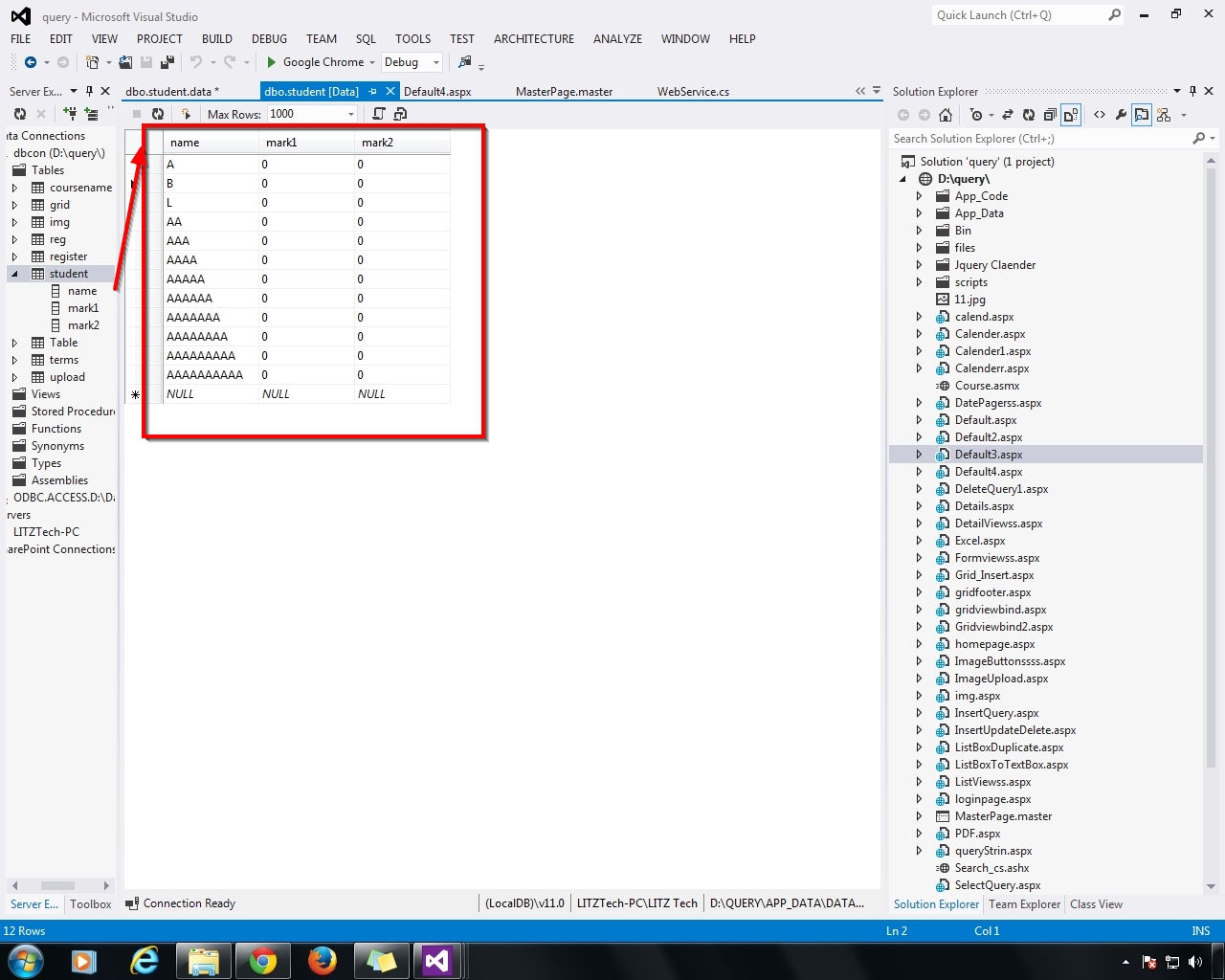
Next - Add New - Webform - Select Master Page - Add
This WebForm Add to Under the MasterPage

WebForm - Add to below the Master Page - OK

New Web Form - Right Click - Add to Default Master's Content

Master Page Contents Add to New WebForm

Next - Run(F5) the New WebForm - Search TextBox - Open - Search The Related Keyword

Next - aaaaaa - Related Names Displayed

Next - Search - b - Related Name Display

Next - Search - Without Table Name - Z - Display No Records Found

Auto Suggestion Search Textbox in MasterPage Search Textbox Add to ContentPlaceHolder and Name Called to Scripts using WebService in Asp.Net C#.
Auto Suggestion Box Master Page
Auto Suggestion Box Multiple Table Search
Auto Suggestion Ajax AutoCompleteExtender
Auto Complete Search For WINDOW APPLICATION
DEMO
WebService.asmx Coding
using System;
using System.Collections.Generic;
using System.Web;
using System.Web.Services;
using System.Configuration;
using System.Web.Script.Services;
using System.Data.SqlClient;
using System.Web.Script.Serialization;
using System.Data;
[WebService(Namespace = "http://tempuri.org/")]
[WebServiceBinding(ConformsTo = WsiProfiles.BasicProfile1_1)]
[System.Web.Script.Services.ScriptService]
public class WebService : System.Web.Services.WebService
{
[WebMethod]
public List<string> AutoSugg(string names)
{
List<string> result = new List<string>();
SqlConnection con = new SqlConnection
(System.Configuration.ConfigurationManager.ConnectionStrings["dbcon"].ToString());
con.Open();
string query = "select name from student where name LIKE @SearchText +'%'";
SqlCommand cmd = new SqlCommand(query, con);
cmd.Parameters.AddWithValue("@SearchText", names);
SqlDataAdapter adp = new SqlDataAdapter(cmd);
DataSet ds = new DataSet();
adp.Fill(ds);
SqlDataReader dr = cmd.ExecuteReader();
if (ds.Tables[0].Rows.Count > 0)
{
while (dr.Read())
{
result.Add(dr["name"].ToString());
}
}
else
{
result.Add("No Records Found");
}
return result;
}
}
Html Coding
<%@ Master Language="C#" AutoEventWireup="true" CodeFile="MasterPage.master.cs" Inherits="MasterPage" %>
<!DOCTYPE html>
<html xmlns="http://www.w3.org/1999/xhtml">
<head id="Head1" runat="server">
<%--AUTOSUGGEST SEARCH TEXTBOX TO MASTERPAGE--%>
<%--AUTOSUGGEST SEARCH TEXTBOX TO MASTERPAGE--%>
<%--AUTOSUGGEST SEARCH TEXTBOX TO MASTERPAGE--%>
<link href="http://ajax.googleapis.com/ajax/libs/jqueryui/1.8.1/themes/base/jquery-ui.css" rel="stylesheet" type="text/css"/>
<script type="text/javascript" src="http://ajax.googleapis.com/ajax/libs/jquery/1.4.2/jquery.min.js"></script>
<script type="text/javascript" src="http://ajax.googleapis.com/ajax/libs/jqueryui/1.8.1/jquery-ui.min.js"></script>
<script type="text/javascript">
$(document).ready(function () {
SearchText();
});
function SearchText() {
$(".autosuggest").autocomplete({
source: function (request, response) {
$.ajax({
type: "POST",
contentType: "application/json; charset=utf-8",
url: "WebService.asmx/AutoSugg",
data: "{'names':'" + document.getElementById('ContentPlaceHolder1_TextBoxAutoSearch').value + "'}",
dataType: "json",
success: function (data) {
response(data.d);
},
error: function (result) {
alert("Error");
}
});
}
});
}
</script>
<%--AUTOSUGGEST SEARCH TEXTBOX TO MASTERPAGE--%>
<%--AUTOSUGGEST SEARCH TEXTBOX TO MASTERPAGE--%>
<%--AUTOSUGGEST SEARCH TEXTBOX TO MASTERPAGE--%>
<title></title>
<asp:ContentPlaceHolder id="head" runat="server">
</asp:ContentPlaceHolder>
</head>
<body>
<form id="form1" runat="server">
<div>
<asp:ContentPlaceHolder id="ContentPlaceHolder1" runat="server">
<asp:TextBox ID="TextBoxAutoSearch" class="autosuggest" runat="server" ></asp:TextBox>
</asp:ContentPlaceHolder>
</div>
</form>
</body>
</html>
First Add - New Master Page Form
Master Page Show ContentPlaceHolder
Next - Add - TextBox To MasterPage ContentPlaceHolder1 - Id Change to TextBoxAutoSearch - Class Name Add to WhatEver Use in Script Name
Next - Add To Web Service Form
Web Service.cs - Add the NameSpaces - [WebMethod] - Next Add Your Coding Below like that
Next - Add Your DataBase Table Name - Read From DataReader & DataSet
Next - Add to Master Page Scripts using JQuery - Below Like That
Call the WebService Name,Data NAme,MethodName
ContentPlaceHolder1_TextBoxAutoSuggest - used to
call the master page TextBox(search MasterPage Must Be Give ContentPlaceHolder Id from Textbox)
Insert the Date To Table Search Field
Next - Add New - Webform - Select Master Page - Add
This WebForm Add to Under the MasterPage
WebForm - Add to below the Master Page - OK
New Web Form - Right Click - Add to Default Master's Content
Master Page Contents Add to New WebForm
Next - Run(F5) the New WebForm - Search TextBox - Open - Search The Related Keyword
Next - aaaaaa - Related Names Displayed
Next - Search - b - Related Name Display
Next - Search - Without Table Name - Z - Display No Records Found


.gif)


