Enable or Disable TextBox in GridView With Footer Total When Checkbox is Checked
GridView Row Ckeckbox is Checked Enable Textbox Enter Amount Finally Get Total Footer Row Using Asp.Net C#.
Download Coding
Download
DEMO

HTML CODING
C# CODING
First Create New Webform - Add GridView From Toolbox - Edit Column - Add TemplateField - Ok

Next - Add Header Text Name

Next - GridView Edit Template Field - Add Label - Edit DataBinding - Bind Field Name

Next - GridView Edit Template Field - Add Textbox - Property - Enable = false

After - DataBound Show GridView

Next - GridView Edit Column - Template Field

GridView - Edit Template Field - Add Checkbox - AutoPostback =true

Checkbox - Double Click
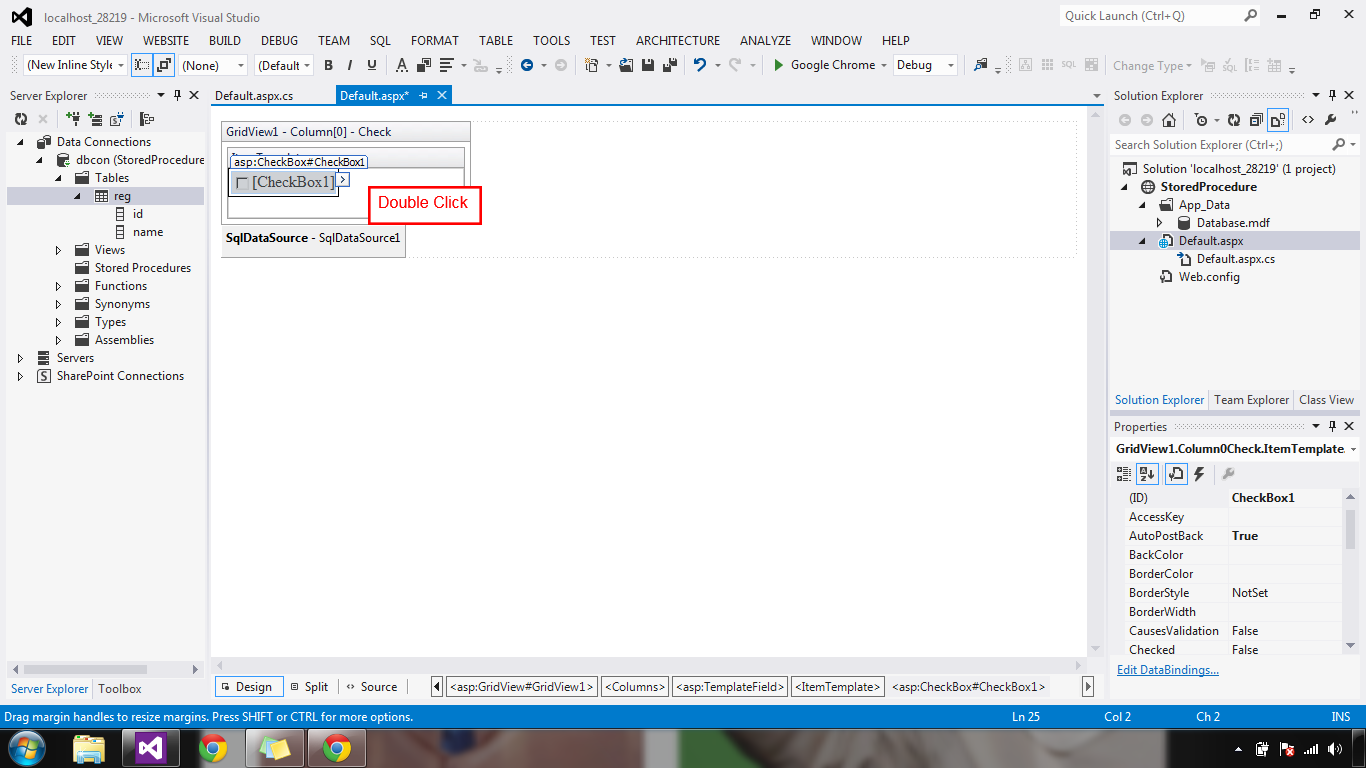
Next - Textbox - Enabled = false

Next - Show GridView After Bind Checkbox

Next - Add Namespaces - Gridview row Event - Checkbox is Checked - Row Event Values Get & enabled= true

Next - Get Total Values to Footer Row

GridView Row Ckeckbox is Checked Enable Textbox Enter Amount Finally Get Total Footer Row Using Asp.Net C#.
Download Coding
Download
DEMO
HTML CODING
<html xmlns="http://www.w3.org/1999/xhtml">
<head runat="server">
<title></title>
</head>
<body>
<form id="form1" runat="server">
<div align="center">
<asp:GridView ID="GridView1" runat="server" AutoGenerateColumns="False" ShowFooter="True">
<Columns>
<asp:TemplateField HeaderText="Check">
<ItemTemplate>
<asp:CheckBox ID="CheckBox1" runat="server" AutoPostBack="True" OnCheckedChanged="CheckBox1_CheckedChanged" />
</ItemTemplate>
</asp:TemplateField>
<asp:TemplateField HeaderText="ID">
<ItemTemplate>
<asp:Label ID="Label1" runat="server" Text='<%# Eval("id") %>'></asp:Label>
</ItemTemplate>
</asp:TemplateField>
<asp:TemplateField HeaderText="Name">
<ItemTemplate>
<asp:Label ID="Label2" runat="server" Text='<%# Eval("name") %>'></asp:Label>
</ItemTemplate>
</asp:TemplateField>
<asp:TemplateField HeaderText="Quantity">
<ItemTemplate>
<asp:TextBox ID="txtQt" runat="server" Enabled="False"></asp:TextBox>
</ItemTemplate>
</asp:TemplateField>
<asp:TemplateField HeaderText="Amount">
<FooterTemplate>
<asp:Label ID="lblTotal" runat="server" ForeColor="#CC3300"></asp:Label>
<asp:Button ID="Button1" runat="server" OnClick="Button1_Click" Text="Total" />
</FooterTemplate>
<ItemTemplate>
<asp:TextBox ID="txtAmt" runat="server" Enabled="false"></asp:TextBox>
</ItemTemplate>
</asp:TemplateField>
</Columns>
</asp:GridView>
</div>
</form>
</body>
</html>
using System;
using System.Collections.Generic;
using System.Linq;
using System.Web;
using System.Web.UI;
using System.Web.UI.WebControls;
using System.Data;
using System.Data.SqlClient;
public partial class _Default : System.Web.UI.Page
{
protected void Page_Load(object sender, EventArgs e)
{
if (!IsPostBack)
{
SqlConnection con = new SqlConnection(System.Configuration.ConfigurationManager.ConnectionStrings["dbcon"].ToString());
con.Open();
SqlDataAdapter adp = new SqlDataAdapter("select * from
reg", con);
DataSet ds = new DataSet();
adp.Fill(ds);
GridView1.DataSource = ds;
GridView1.DataBind();
}
}
protected void CheckBox1_CheckedChanged(object sender, EventArgs e)
{
CheckBox chk = (CheckBox)sender;
GridViewRow gr = (GridViewRow)chk.NamingContainer;
CheckBox ch = (CheckBox)gr.FindControl("CheckBox1");
TextBox txtQt = (TextBox)gr.FindControl("txtQt");
TextBox txtAmt = (TextBox)gr.FindControl("txtAmt");
if (chk.Checked)
{
txtAmt.Enabled = true;
txtQt.Enabled = true;
}
else
{
txtQt.Text = "";
txtAmt.Text = "";
txtAmt.Enabled =false;
txtQt.Enabled =false;
}
}
protected void Button1_Click(object sender, EventArgs e)
{
//
Footer total Button
int total1=0;
foreach (GridViewRow gr in GridView1.Rows)
{
CheckBox ch = (CheckBox)gr.FindControl("CheckBox1");
if (ch.Checked & ch!=null)
{
TextBox txtAmt = (TextBox)gr.FindControl("txtAmt");
Label lbltotal = GridView1.FooterRow.FindControl("lblTotal") as Label;
total1 += Convert.ToInt32(txtAmt.Text);
lbltotal.Text =
total1.ToString();
}
}
}
}
First Create New Webform - Add GridView From Toolbox - Edit Column - Add TemplateField - Ok
Next - Add Header Text Name
Next - GridView Edit Template Field - Add Label - Edit DataBinding - Bind Field Name
Next - GridView Edit Template Field - Add Textbox - Property - Enable = false
After - DataBound Show GridView
Next - GridView Edit Column - Template Field
GridView - Edit Template Field - Add Checkbox - AutoPostback =true
Checkbox - Double Click
Next - Textbox - Enabled = false
Next - Show GridView After Bind Checkbox
Next - Add Namespaces - Gridview row Event - Checkbox is Checked - Row Event Values Get & enabled= true
Next - Get Total Values to Footer Row


